
Export to Excel
PC CADDIE offers the option of exporting to Excel. This export is stored as standard. You can therefore print any list on the screen in PC CADDIE:

Then click on the button Copy button. The content of the list is then copied to the clipboard.

Now open a new page in Excel, click with the mouse in an empty field and press Ctrl + V on the keyboard (for pasting from the clipboard) or click on the symbol in Excel:

The copied contents are then in the Excel table:

You can also use the practical functions in Excel:
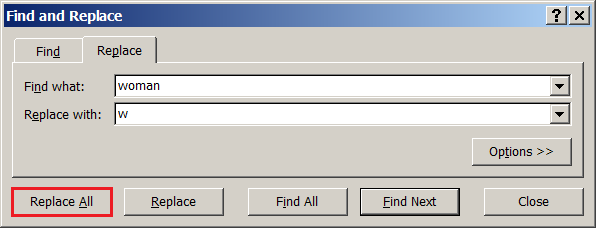
- The Find + Replace function can be found by pressing Ctrl + F. This allows you to search for a word „female“ and replace it with a „w“, for example.
- Lists that no longer fit on an A4 page when printed from PC CADDIE, for example, can be displayed in full in Excel, as any number of columns are available.
- The sort and filter function in Excel can be very practical. Always select the entire worksheet and filter and sort according to the columns.

 All lists can be exported to Excel, with the exception of the course rating table.
- Keine Schlagworte vergeben
PC CADDIE AG
Bachtelweg 3
6048 Horw/Luzern
Schweiz
Kontakt
 Fon +49 2642 9854110
Fax +49 2642 9854199
 Fon +41 41 5110600
Fax +41 41 5110699
 Fon +43 13 55667788
Fax +43 13 55667799
Mail support@pccaddie.com
Web www.pccaddie.com
Support Online-Module
PC CADDIE://online
GmbH & Co. KG
Fon: +49 2642 9854120
Fax: +49 2642 9854169
Mail support@pccaddie-online.de
Web www.pccaddie-online.de
Tägliche Supportzeiten:
April-Oktober
09.00 - 20.00 Uhr
November-März
09.00 - 18.00 Uhr